

Most indoor cellular problems are not caused by weak carrier networks. They are caused by buildings.
Concrete, coated glass, steel framing, and dense crowds all interfere with radio performance in ways outdoor infrastructure was never designed to handle. That is why phones can show full signal strength while payments fail, calls drop, and apps stall inside otherwise well-connected venues.
In 2026, organizations have more options than ever to improve indoor connectivity. The challenge is not finding a solution. It is choosing the right level of infrastructure for the problem. This guide explains how to diagnose what is actually happening inside your building and how models like DAS, small cells, private cellular, and carrier Wi-Fi offload compare in real commercial environments.
Nearly all enterprise activity now happens indoors, where RF behaves very differently than it does outdoors. Building materials absorb signal. Human density increases interference. And macro cellular networks were originally engineered for outdoor coverage, not for consistent performance deep inside commercial structures.
At the same time, new spectrum in 6 GHz and the rollout of Wi-Fi 7 are changing what enterprise networks can support without major construction. Many organizations already operate infrastructure capable of carrying far more indoor traffic than they realize. This guide provides a practical framework for evaluating solution paths and explains where a carrier offload approach like LongFi fits within modern enterprise connectivity strategy.
Key Takeaways
- Most enterprise activity is indoors, so building materials and people drive performance problems. Nearly 90% of enterprise activity occurs inside buildings (Ericsson).
- Dense crowds can reduce signal by over 20 dB, and poor capacity design causes congestion. Industry best practice targets about 25 clients per radio (Cisco Meraki, BlueIOT).
- Existing enterprise Wi‑Fi can carry more load with modern tech. Wi‑Fi 7 has shown a 37% downlink throughput gain vs Wi‑Fi 6 in testing (Alethea Communications), and the US opened 1,200 MHz of new 6 GHz spectrum (FCC).
Why Indoor Connectivity Still Fails in 2026
Indoor connectivity fails because the environment is hostile to radio. Macro networks were built for outdoor coverage, not to push clean signal through concrete, glass, and metal at scale. Inside buildings, human bodies themselves absorb RF energy, which can reduce signal by over 20 decibels in dense crowds (BlueIOT).
Traditional solutions like distributed antenna systems can address these issues, but they often require long design cycles and significant infrastructure investment, which makes them impractical for many commercial properties.
The stakes are higher indoors, where almost all enterprise activity happens. Nearly 90% of enterprise work occurs inside buildings, so the impact of weak indoor cellular is persistent, not occasional (Ericsson).
At busy events, demand explodes. A single stadium with 80,000 attendees can generate 160,000 to 240,000 simultaneous connection attempts, which will overwhelm poorly designed capacity plans (Ekahau).
For commercial venues, this shows up as dropped calls at the host stand, slow app payments at checkout, and staff radios that lag during peaks. It is less a “bars” issue and more a building, capacity, and traffic-routing problem.
Start with Diagnosis: What Problem Are You Actually Solving?
Misdiagnosis leads to the wrong project. Map problems to four buckets:
- Coverage: Areas with no service indoors.
- Capacity: Too many devices per radio, sessions time out.
- Congestion: Users connect but experience slow data at peaks.
- Dead zones: Specific rooms, corners, or basements consistently fail.
Capacity is often the quiet culprit. A practical design target is about 25 clients per radio, or roughly 50 per access point, to preserve quality of experience (Cisco Meraki). Crowds also absorb signal, so density and people flow must be modeled (BlueIOT).
Quick diagnostic checklist
- Where do complaints cluster: entire building or specific zones?
- When do issues spike: lunch rush, events, or always on?
- Are problems voice-only, data-only, or both?
- How many clients per radio during peaks, and what is airtime utilization?
- Do you have qualified enterprise Wi‑Fi with centralized control, or consumer gear?
- What security segmentation exists for guest, operations, and any offloaded traffic?
Coverage vs Capacity: The Most Common Misdiagnosis
Many indoor connectivity projects begin with the assumption that signal strength is the problem. In practice, capacity limitations are often the real constraint. Phones may display strong signal while still competing for airtime with dozens of nearby devices. Distinguishing between coverage gaps and capacity saturation early can prevent unnecessary infrastructure investment and lead to faster improvements.
Main Solution Paths for Indoor Connectivity
Each model fits different problems, budgets, and timelines. There is no single best answer for every property. Use this comparison to narrow options before engaging vendors.
Model comparison by fit, complexity, and lift
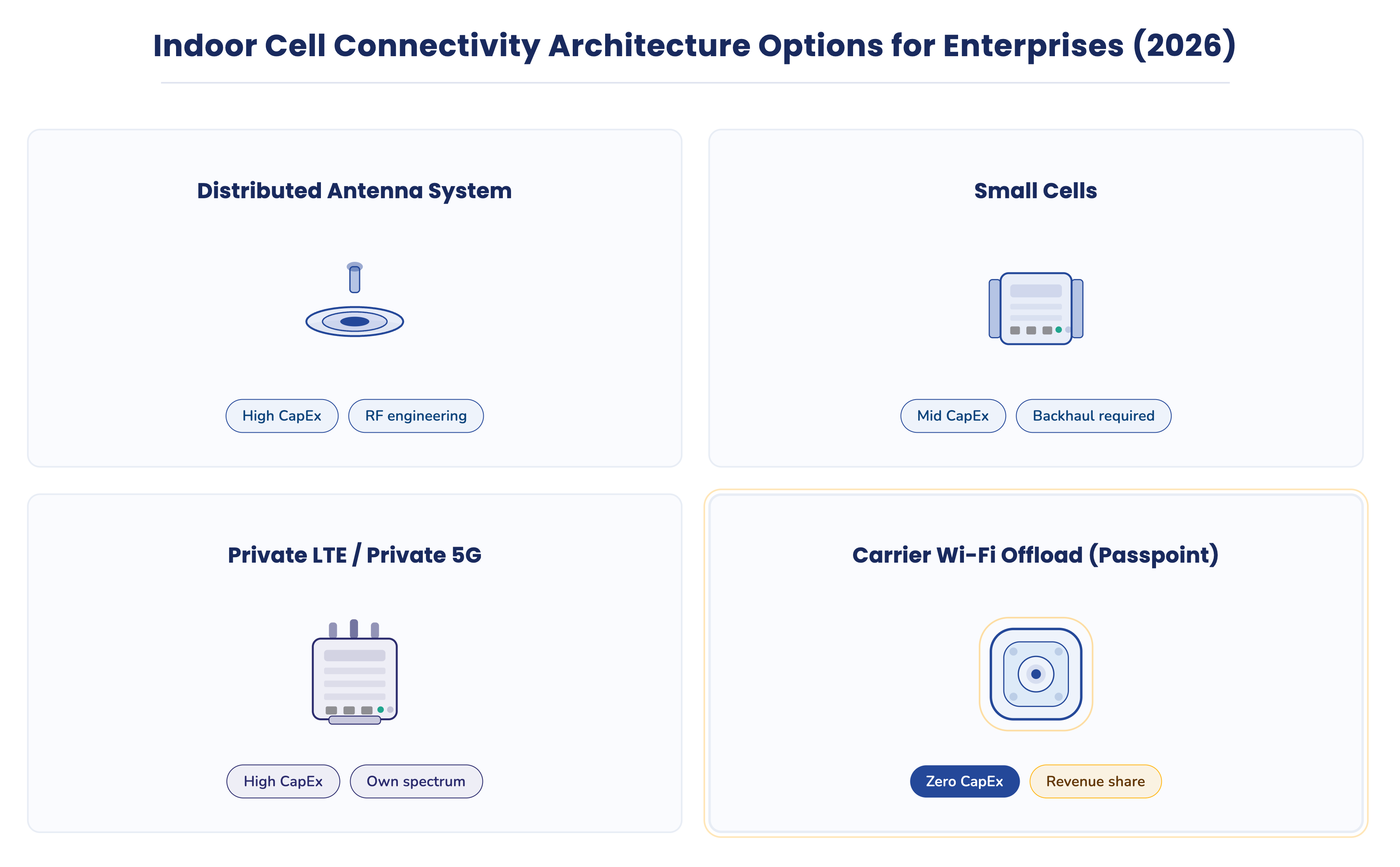
| Model | Best fit | Strengths | Complexity/Lift | Timeline | Notes |
|---|---|---|---|---|---|
| DAS | Very large venues, multi-carrier needs | Multi-operator coverage, carrier-grade | High design and integration complexity | Longer | Often requires carrier coordination and construction inside risers and ceilings |
| Small cells | Targeted areas, single-carrier augmentation | Improves localized coverage and capacity | Moderate, per-carrier hardware and backhaul | Medium | Good for spot coverage where macro is weak |
| Private LTE/5G | Industrial, campus, robotics/IoT | Deterministic QoS for OT, SIM control | Moderate to high, spectrum and device planning | Medium | Strong for on-prem robots and tracking, as seen with private 5G deployments supporting mobile robots and personnel tracking |
| Carrier Wi‑Fi offload | Commercial venues with qualified enterprise Wi‑Fi | Leverages existing Wi‑Fi, SIM-based auth, low lift | Low to moderate, configuration and policy | Short | Uses Passpoint, routes traffic to carrier, keeps business network segmented |
In practice, high-density venues rarely rely on a single approach.
Carrier Wi-Fi offload deployments can often move from evaluation to activation far faster than infrastructure-heavy approaches that require carrier coordination, construction access, and multi-stage RF design.
This difference is primarily due to reduced construction requirements and the ability to leverage existing enterprise Wi-Fi controllers rather than installing new RF distribution infrastructure.
Large deployments often combine multiple techniques depending on building layout, carrier participation, and expected traffic patterns.
For example, advanced Wi‑Fi designs mix under-seat and directional antennas, as seen with modern stadium access points, and rely on site survey tools to validate pre and post deployment performance. Tools like Ekahau Sidekick 2 support this process in large public venues (Ekahau).
Private cellular becomes compelling for on-prem workloads like mobile robots or personnel tracking, where deterministic connectivity is required, and enterprises want SIM control. Major carriers now offer managed private cellular options for these scenarios, particularly in logistics environments, manufacturing facilities, and large campus deployments where deterministic connectivity is required.
Carrier Wi‑Fi offload is different. It uses enterprise Wi‑Fi as a secure transport so phones attach via SIM credentials using Passpoint (Wireless Broadband Alliance), and traffic flows to the carrier, not into business systems. That lowers lift for many commercial properties when the enterprise Wi‑Fi is already in place.
Why Enterprise-Grade Wi‑Fi Matters More Than Many Teams Realize
Enterprise Wi-Fi is no longer just an amenity for guests. It has become core indoor infrastructure that determines how reliably phones, payment systems, staff applications, and cloud services operate inside commercial spaces.
New spectrum and standards raise the ceiling for what a venue can deliver without major RF construction. The US opened 1,200 MHz in the 6 GHz band, unlocking wide channels and reducing interference (FCC). Market adoption is real. By late 2024, over 1,230 devices were certified for Wi‑Fi 7, and thousands already supported 6 GHz (Wi‑Fi Alliance).
Performance gains are tangible. In controlled testing environments, Wi-Fi 7 access points have demonstrated meaningful throughput gains compared to Wi-Fi 6 under multi-client load conditions, reflecting improvements in channel width, scheduling efficiency, and spectrum availability (Alethea Communications). The industry also views 6 GHz as strategically important, with 65% of respondents calling it important or critical to their Wi‑Fi business (Wireless Broadband Alliance).
Upgrades are not free, but they are predictable. Typical enterprise Wi‑Fi 6 access points range from $400 to $800, labor commonly runs $75 to $150 per hour, and fiber cabling is often $1.00 to $3.00 per foot (UFO Cable). When you already operate a managed, segmented Wi‑Fi environment, a carrier offload approach can change the economics and timeline versus heavier alternatives.
Ideal Venues for Carrier Wi-Fi Offload
Carrier Wi‑Fi offload is strongest where people already connect and linger indoors. Think hospitality, restaurants and bars, retail and mixed‑use properties, gyms and studios, clinics and medical practices, and entertainment venues. These environments have recurring foot traffic, dwell time, and phone dependency for staff and guests.
We have seen offload help in district settings too. In New Orleans’ French Quarter, adjacent hospitality and retail venues operate in dense, high‑interference corridors where indoor reliability is challenging. A district‑scale deployment across Bourbon, Decatur, Canal, and Royal Streets demonstrated stable performance as users moved between venues and outdoor spaces.
Offload is not recommended for properties with very low foot traffic or locations that require fully standalone, carrier‑owned DAS builds due to unique constraints. It also depends on having or being willing to deploy enterprise‑grade Wi‑Fi with proper segmentation and management.
2026 Evaluation Checklist for Indoor Connectivity
- Inventory your infrastructure: controller, AP models, PoE, backhaul, fiber runs, and VLAN design.
- Confirm enterprise‑grade Wi‑Fi: centralized management, policy control, and ability to segment traffic.
- Map complaints and busiest periods: which zones, which hours, voice vs data, staff vs guest.
- Capacity profile: clients per radio at peak and airtime utilization; design to ~25 clients per radio (Cisco Meraki).
- Security posture: WPA3 where supported, strong segmentation for guest, operations, and any offloaded traffic.
- Upgrade scope if needed: AP refresh, cabling, or fiber. Budget labor at $75 to $150 per hour and fiber at $1.00 to $3.00 per foot (UFO Cable).
- Success criteria: 30 days fewer complaints in target zones, 60 days stable peak performance, 90 days sustained operations without staff workarounds.
- Operational lift: who will monitor, make changes, and handle escalations during peak seasons.
How LongFi Fits Into This Decision Framework
LongFi is an example of how carrier Wi-Fi offload can be implemented as a practical infrastructure layer inside commercial environments rather than as a telecom construction project. It improves indoor cellular experience by securely leveraging a venue’s existing enterprise‑grade Wi‑Fi as the transport layer for carrier traffic. Devices authenticate automatically using Wi-Fi Certified Passpoint, which allows phones to connect securely using SIM credentials instead of shared passwords or captive portals (Wi-Fi Alliance). In this architecture, Passpoint enables SIM-based authentication, and eligible traffic is routed directly into the carrier core network, not into business systems, maintaining strict enterprise boundaries between operational systems, guest traffic, and carrier-routed sessions while keeping authentication under carrier control.
Segregated VLANs and firewall rules maintain strict separation from operational networks, preserving security and workflows.
Where a venue already runs compatible enterprise Wi‑Fi from platforms such as Ubiquiti, Cisco, HPE Aruba, Juniper, or Fortinet, deployment is typically configuration-level work inside existing network controllers and can often be completed remotely with the venue IT team when compatible enterprise Wi-Fi infrastructure is already in place. LongFi operates alongside existing carrier networks and guest Wi‑Fi, does not inspect user content, and emphasizes operational simplicity.
Economically, carriers compensate based on real data that flows through the deployment. Venues and trusted partners share in usage‑based monthly revenue. LongFi has been deployed across 100+ live US locations, including a district‑scale footprint across New Orleans’ French Quarter, demonstrating reliability in dense, high-interference corridors. As always, outcomes vary by venue layout, traffic, existing Wi‑Fi quality, and carrier participation.
Common Questions About Indoor Connectivity Optimization
Do I need new hardware?
It depends. If you want Wi‑Fi 7 gains or 6 GHz access, you need compatible APs. Market support is growing, with more than 1,230 Wi‑Fi 7 certified devices by late 2024 (Wi‑Fi Alliance), and the US has opened 1,200 MHz in 6 GHz (FCC).
Is this the same as DAS?
No. DAS is a distributed antenna system that extends carrier signal inside buildings, usually with higher design and integration lift. Carrier Wi‑Fi offload uses enterprise Wi‑Fi as transport and authenticates phones via SIM using Passpoint.
Does this affect my operational traffic?
Properly implemented offload keeps carrier-connected devices segmented on dedicated VLANs and routes traffic to the carrier, not into business systems. Operations and POS stay isolated.
What kinds of venues are good candidates?
High‑traffic commercial environments such as hospitality, retail and mixed‑use, gyms, clinics, and entertainment spaces, plus dense venues that require disciplined capacity planning. Large events can generate massive simultaneous attempts that demand careful RF design (Ekahau).
Is this about better experience, revenue, or both?
Both. Reliable indoor connectivity improves guest satisfaction and staff productivity. Usage‑based models can also create monthly recurring revenue for properties and partners.
Conclusion: Choose the Right Level of Infrastructure for the Problem
Not every indoor connectivity issue needs the heaviest solution. Start with diagnosis. If the challenge is capacity and congestion in spaces where people dwell, evaluate how much you can achieve by using the enterprise Wi‑Fi you already manage. New spectrum and Wi‑Fi 7 can materially change outcomes, and in many properties a carrier Wi‑Fi offload approach is a practical, lower‑lift path.
Not every indoor connectivity gap is a coverage problem, and not every solution requires construction. Diagnose first, then choose the model that matches your building, density, and operations. If you already run enterprise‑grade Wi‑Fi with solid segmentation and centralized control, you are already equipped for a workable fix. New 6 GHz spectrum, maturing Wi‑Fi 7 performance, and disciplined capacity planning can raise the ceiling on what your Wi‑Fi delivers indoors while heavier options remain available when needed.
If you are evaluating options for improving indoor connectivity, LongFi can review your environment, confirm whether your existing enterprise Wi-Fi qualifies for carrier offload, and help determine whether that approach or a heavier solution like DAS is the better fit. The goal is not to force a model, but to match the right level of infrastructure to the actual problem inside your building.
References
- Ericsson: Indoor Connectivity Report – According to Ericsson, nearly 90% of enterprise activity occurs inside buildings.
- Cisco Meraki: High-Density Wi-Fi Design – Industry best practice targets about 25 clients per radio.
- BlueIOT: Wi-Fi Signal Interference Causes and Solutions – Dense crowds can reduce signal by over 20 dB.
- Alethea Communications: Wi-Fi 7 vs Wi-Fi 6 Performance Comparison – Wi-Fi 7 has shown a 37% downlink throughput gain vs Wi-Fi 6 in testing.
- FCC: FCC Opens 6 GHz Band for Wi-Fi and Other Unlicensed Uses – The US opened 1,200 MHz of new 6 GHz spectrum.
- Ekahau: Wi-Fi in High-Density Venues – A single stadium with 80,000 attendees can generate 160,000 to 240,000 simultaneous connection attempts.
- Wireless Broadband Alliance: Passpoint Wi-Fi Roaming – Carrier Wi-Fi offload uses Passpoint for SIM-based authentication.
- Wi‑Fi Alliance: Wi-Fi 7 Certified Device List – Over 1,230 devices were certified for Wi‑Fi 7 by late 2024.
- Wireless Broadband Alliance: Annual Industry Report 2024 – 65% of respondents called 6 GHz important or critical to their Wi‑Fi business.
- UFO Cable: Fiber Optic Cable Installation Cost – Fiber cabling is often $1.00 to $3.00 per foot.
- Wi-Fi Alliance: Discover Passpoint – Devices authenticate automatically using Wi-Fi Certified Passpoint.